I realized recently that the version of Baker’s Dozen that’s on Amazon is quite old — the last time I updated the file, I only had four books out (and Shell Game was still in two volumes). Now I have about two dozen books out (more if you include the print versions of Holiday Heat), but people reading Baker’s Dozen didn’t have any way to know that if they didn’t click on my author name on the Amazon page.
So I decided to do an experiment. Baker’s Dozen scores pretty highly on the algorithm, and it’s my most popular book. What if I changed the file so it had all of my books in the “books by this author” section? It took me about an hour to redo the file — the Kindle Create program is great for making books, but it has a lot of limitations, including the fact that you can’t make a template (so every time I create a new book I have to copy/paste every single one of my books into the program; I made a TXT file with all of it but it’s still a pain in the ass) — and about three days for the file to be accepted and published by Amazon.
However, when I went to my Kindle app to see the new file, it wasn’t there. In fact, I hadn’t actually purchased a copy of Baker’s Dozen because I’ve been a Kindle unlimited subscriber since before I got my current phone, so I had a “borrowed” version of the book sitting on my phone for a while. I recently stopped using KU for reading books (I found a library that had everything I wanted, pretty much, and didn’t cost $12/month), although I do still buy Kindle books to support authors I like, but that meant I didn’t have a version of Baker’s Dozen. So I bought one, thinking I’d get the new file.
I did not. I got the old file. It makes me think the Kindle app had cached the old file on my phone and just “unlocked” it so I could read it. To see the new file, I had to remove the book from my phone’s library and then re-download it.
My hope was that Amazon would automatically update every Baker’s Dozen copy the next time the book was opened or requested, and that meant people would get the new version, which had the new “Books About This Author” pages (more on that in a moment). But since I updated the file I’ve only had Holiday Heat: January read, and only a few pages of it — people love Baker’s Dozen and are either rereading it, buying it, or borrowing it — so my experiment (updating the book to contain links to my other books) has failed so far. Oh well.
The moral of this story: if you have Baker’s Dozen on your Kindle or in your Kindle app, delete it and re-download it so you get the new version. You can tell by viewing the table of contents; if it looks like this, you have the latest version.
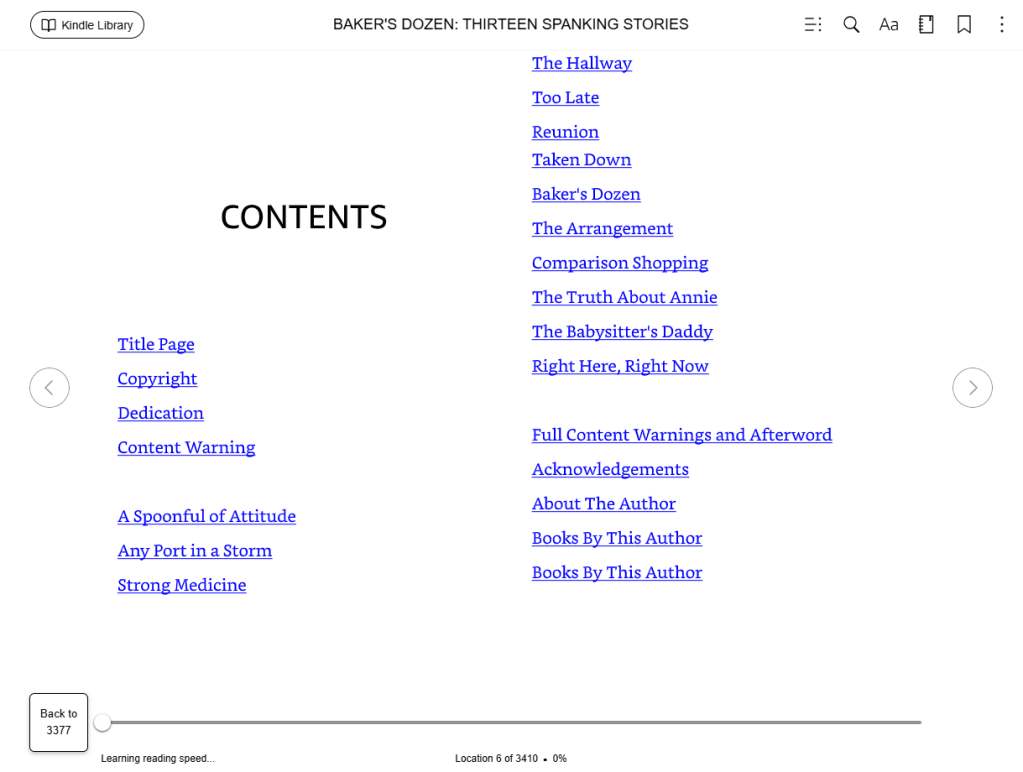
I’m sure you can see there are two “Books By This Author” pages. This is not an error; it’s on purpose. Another limitation of Kindle Create is that when you use a templated page type it doesn’t let you change the header (which is what shows up in the table of contents). I ended up doing two different BBTA pages — one for Holiday Heat, and one for the rest of my books. It looks a little sloppy to my eyes, but it’s the best I could do.
 JJ Rose, Author